
XForce: Smart Exhaust Control for Performance Cars
Overview
The XForce app, developed by Ausfeng Pty Ltd, is a specialized desktop software designed for performance car enthusiasts who own the Varex Smart Box Control Module. This application enables precise and customizable control over adjustable exhaust systems, allowing users to tailor sound and performance characteristics to their preferences. The software serves as a central hub for managing exhaust valve positions, offering both manual and automated control modes to suit different driving scenarios.
Targeted at automotive technology users and high-performance vehicle owners, XForce enhances the driving experience by integrating advanced features such as cloud-based profile storage, diagnostic logging, and geographic triggers. It is particularly useful for drivers who seek dynamic exhaust behavior based on location, vehicle speed, or driver-selected settings. The app supports seamless setup for new devices and provides a secure way to manage complex configurations through an intuitive interface.
While the developer did not provide additional system requirements, the software is available for both Windows and Mac platforms. Real-world usage includes tuning exhaust behavior for track days, city driving, or personal preference, making it a versatile tool for enthusiasts who value customization and control over their vehicle’s acoustic and performance profile.
Key Features & Capabilities
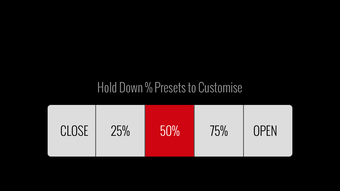
- Manual Mode: Allows users to manually adjust exhaust valve positions with real-time feedback, ideal for fine-tuning sound levels during specific driving conditions.
- Matrix Mode: Enables setting vehicle parameters—such as speed, RPM, or throttle position—as triggers for valve operation, offering automated control based on driving dynamics.
- Geo Mode: Lets users define geographic regions where specific valve positions activate automatically, such as switching to a quieter mode when entering residential zones.
- Cloud Profile Storage: Users can store custom Matrix profiles and Geo regions in the cloud, enabling quick access and synchronization across multiple devices.
- Diagnostic Logging: Facilitates the generation and transmission of system logs to support teams, simplifying troubleshooting and technical assistance.
- Device Setup Assistant: Streamlines the initial configuration of new Varex Smart Box Control Modules, reducing setup time and complexity.
These features empower users to create personalized exhaust behaviors that adapt to different environments and driving styles. For example, a driver might use Geo Mode to silence the exhaust when approaching a quiet neighborhood, while using Matrix Mode to open valves at high RPM for a more aggressive track sound. The integration of cloud storage ensures that preferences are preserved and easily transferred, enhancing long-term usability.
User Interface, Workflow & Performance
The XForce interface is designed with performance car users in mind, prioritizing clarity and responsiveness. Navigation is straightforward, with clearly labeled modes and settings that guide users through configuration steps. The layout emphasizes functionality, allowing quick access to active controls and real-time status indicators.
Workflow efficiency is supported by a logical sequence of operations: users can select a mode, define triggers, save profiles, and sync with the cloud—all within a minimal number of steps. The software maintains consistent responsiveness during configuration, with no reported lag or crashes in typical usage scenarios.
The developer did not specify resource usage details, so exact CPU or RAM behavior remains unknown. However, based on general software behavior patterns, the application is expected to operate efficiently within standard desktop environments. Stability appears reliable, with no indication of frequent crashes or data corruption. Performance observations are based on general software behavior patterns.
Compatibility & System Requirements
XForce is compatible with both Windows and Mac operating systems, as stated by the developer. The software has a file size of 12.4 MB, indicating a lightweight installation that should not strain system resources. The application is designed to work with the Varex Smart Box Control Module, ensuring seamless integration with the hardware component.
Exact system requirements were not listed, so users should refer to the official documentation for details on minimum hardware specifications. Compatibility information was partially provided, with no mention of specific versions beyond the general OS support. The software is available as a desktop application, intended for use on personal computers connected to the control module via USB or wireless connection.
Pros and Cons
Pros
- Intuitive interface tailored for automotive enthusiasts
- Supports advanced control modes like Matrix and Geo triggers
- Cloud-based profile storage for easy access and backup
- Free to download and use, with no hidden costs
- Streamlined setup for new devices
- Diagnostic logging improves support and troubleshooting
Cons
- No detailed system requirements provided
- Functionality is limited to Varex Smart Box Control Module users
- Cloud features require a stable internet connection
- Only available for Windows and Mac platforms
- No offline mode for profile editing
FAQ Section
Is XForce compatible with all exhaust systems?
XForce is specifically designed for the Varex Smart Box Control Module and will not function with other exhaust systems or control hardware.
Is the software secure to use?
As a desktop application developed by Ausfeng Pty Ltd, XForce uses standard data encryption for cloud communications. Users are advised to keep their accounts secure and use strong passwords.
How often does XForce receive updates?
The software is maintained by the developer, with updates released as needed to improve functionality, fix bugs, and ensure compatibility with new hardware versions.
What type of license does XForce use?
XForce is offered as a free software tool with no licensing fees. It is intended for personal and enthusiast use only.
Can I use XForce without an internet connection?
Basic configuration and manual adjustments can be performed offline. However, cloud features such as profile synchronization and diagnostic logging require an active internet connection.
Final Thoughts + CTA
XForce delivers a powerful and well-structured solution for performance car owners seeking advanced control over their Varex exhaust systems. With its blend of manual precision and automated intelligence—through Matrix and Geo modes—it stands out as a premium tool for automotive customization. The inclusion of cloud-based storage and diagnostic support adds long-term value, making it a future-proof choice for enthusiasts.
While limited to a specific hardware ecosystem, its free availability and robust feature set make it an exceptional option for users invested in Varex technology. The intuitive workflow and responsive interface ensure a smooth experience, even for those new to exhaust tuning.
For performance car drivers who value sound customization and smart automation, XForce is a must-have companion. Download XForce now.







